Ask across your files.
Choose the files or folders you want help with. Ask a question in ordinary language, then open the linked sources to check the answer.
A little help with the files on your computer.
Find the detail buried in a report. Check it against the source. Turn it into a document you can use. Lemonade does the AI work on your own computer.
14 days free, no credit card. $49 once to keep it.
For Windows 11 & Linux
“Do these reports tell the same story?”
Compare files and follow the sources back to the original.
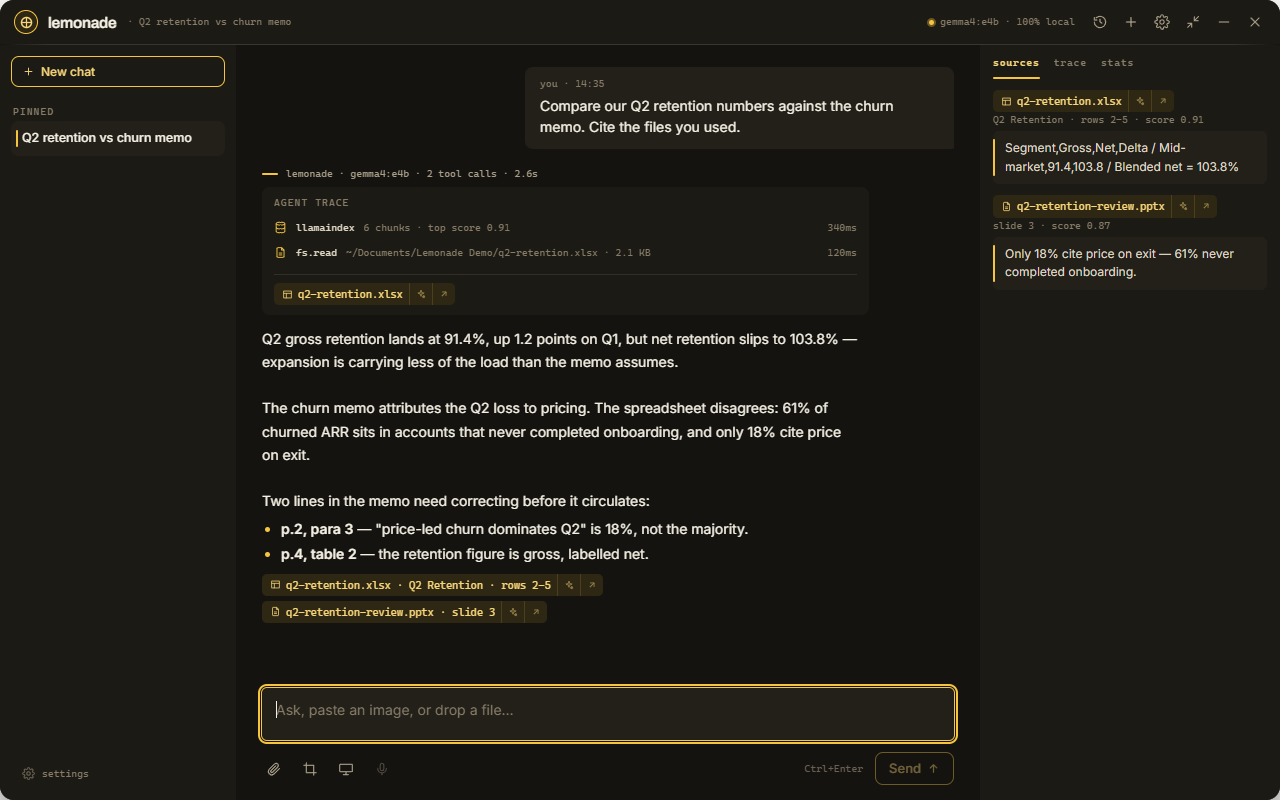
A number in a spreadsheet. A detail in last month’s report. You shouldn’t have to reread everything to find it.
Choose the files or folders you want help with. Ask a question in ordinary language, then open the linked sources to check the answer.
Turn what you’ve found into a Word document, Excel workbook, PowerPoint presentation or PDF. Review the draft and keep editing in your usual apps.
A short look at finding an answer, checking the source, and reviewing the result.
An illustrated tour using real Lemonade screens and sample files. Timing is edited.
A desk full of papers gives way to Lemonade. A question asks whether a quarterly spreadsheet and a presentation agree. The answer identifies a mismatch and links to the source files. A file review shows the proposed edits before approval. An Excel workbook opens in the editor, ready for further changes. Try Lemonade free for 14 days on Windows or Linux, then pay $49 once if it fits your work.
Lemonade processes your documents and AI conversations locally. You can get help with your work without uploading it to a cloud AI service.
See exactly what uses the internetGive Lemonade the files you want it to work with. Keep file changes set to Ask to review edits before they’re saved.
After the initial downloads, local chat and file work run offline. Setup, updates, licence checks and optional web or email tools use the internet.
Guided setup helps you download a model for your computer. No terminal commands or model API keys. Check the requirements.
Try it with the work you actually do. You get 14 days to see how it runs on your computer before buying a licence.
One personal licence
$49 USD / once
A perpetual licence. No monthly payment.
Try free for Windows Try free for Linux14-day free trial. No credit card required.
$49.00 USD · one-time payment
Buy 10 or more licences and save 10% on the entire order.
One key per person, for up to 3 computers each. Buying for a team? Share the separate keys after checkout. For more than 100 licences, contact us.
Need a hand?
Get in touch.
Ask questions about your documents, summarise long files, compare information across reports, and draft Word documents, Excel workbooks, PowerPoint presentations or PDFs. You can also share a screenshot and ask for help understanding it.
No. Setup guides you through downloading the AI it needs and choosing files to work with. You ask in ordinary language. There is no terminal setup or model API key to manage.
Your documents and AI conversations are processed on your computer, without a cloud AI service. Optional web research and connected email use the relevant online services with your permission. Setup downloads, updates and licence checks also use the internet.
No. Try Lemonade free for 14 days without a credit card. If it fits your work, a personal perpetual licence costs $49 once and can be activated on up to three computers.
Yes. After the initial downloads, you can chat and work with your local files offline. Web research, connected email, downloads and licence activation need an internet connection.
Lemonade supports Windows 11 and Linux on 64-bit x86 computers. Start with at least 8 GB of RAM and about 3 GB of free disk space; additional models need more space. A graphics card is optional. We recommend 16 GB of RAM and a graphics card with 8 GB of memory for a better experience. A macOS download is not available yet.
Yes. Lemonade creates Word (.docx), Excel (.xlsx), PowerPoint (.pptx) and PDF files. Review and edit the result, then open it in the applications you already use.
Lemonade is built for everyday work with your own files. Answer quality and speed depend on your computer and the AI model you use; the largest cloud models can be stronger at complex reasoning. Use the free trial to try your own tasks, and check important answers against their sources.
There is no account to sign into, so we send the key again to the address you bought with.
Start with a report you’ve been meaning to read.